CodeSquare: offline QR creation with local project history
CodeSquare generates QR codes entirely offline, showing a live preview as you type and letting you save PNG exports locally. Developed by fareed8654 as a casual Android app, it bundles QR encoding for text, URLs, contacts, and Wi‑Fi into a single workflow. The interface avoids accounts, internet access, and camera permissions, and offers adjustable error correction and high-contrast color choices. It's aimed at privacy-conscious users, students, and professionals who need offline, local QR management without ads or tracking.
What kind of game is CodeSquare?
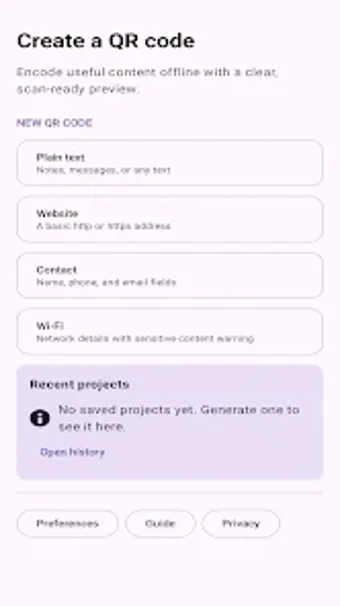
In this app, the player creates scannable QR codes rather than playing a traditional game loop. CodeSquare focuses on deterministic tasks: enter text, a URL validated for http/https, a contact block, or Wi‑Fi credentials, and the tool renders a code in real time. The app stores projects locally and displays a searchable history so saved codes can be edited or renamed without network involvement.
Does it have multiplayer or sharing modes?
Sharing is handled through local exports, not online services. You export crisp PNG images to device storage for manual sharing or printing. The app does not require accounts, cloud sync, or third‑party services, so any transfer between devices must use the user's chosen local method. Wi‑Fi credentials are treated as sensitive and are only saved when you explicitly confirm the save action.
What does the interface look and sound like?
In this experience, the interface prioritizes legibility and scan reliability. CodeSquare offers high‑contrast foreground colors, quiet‑zone margin settings, and adjustable error correction to produce codes that scan reliably under varying conditions. There is a real‑time preview pane that shows the generated code as fields change; the app does not request camera permission and contains no ads, so audio or ambient feedback is not part of the core workflow.
Is it hard to get started and how long does progression take?
Getting started is immediate: no onboarding account or internet is required and the app validates URL formats before encoding. There is no progression system or unlockables; the experience is utilitarian. Search and edit of local projects lets you build a small library over time, so repeat use depends on how many saved codes you create and manage on the device.
Clear recommendation for privacy-first, task-focused users
CodeSquare is a practical pick for users who need offline QR creation and a local project history without ads or tracking. It suits anyone who prefers local PNG exports, explicit control over saving sensitive Wi‑Fi entries, and configurable error correction. However, users who expect cloud sync or integrated sharing won't find those features here. For privacy-conscious workflows, it's worth trying.